Every month, somebody loses a week to this.
Statements, contracts, letters and certificates, built one at a time against a deadline. It is slow, it is easy to get wrong, and every new client adds admin instead of margin.
-
01
The same document, rebuilt hundreds of times.
Open the template, change the name, save, rename, repeat. For every single person.
-
02
One wrong figure, in front of a client.
A copy-paste slip on someone’s money becomes a complaint, a churned client, or an FSCA question.
-
03
The whole run lives on one person’s laptop.
They know the trick that makes it work. They take leave, and month-end quietly grinds to a halt.
-
04
Deadlines met by working late, not better tools.
The increase letters, the annual statements, the renewal notices. The date never moves and it is always a scramble.
-
05
Every new client adds admin, not margin.
More recipients means more hours. Growth starts costing you instead of paying you.
-
06
Word gives up before you do.
This is not an opinion about Word. It is what Word does.
“Microsoft does not include a function to merge documents to separate files.” A Microsoft Word MVP
You don’t have 1,000 documents to make. You have one template.
Find the one that eats your month.
The ones that come round every month, every quarter, every renewal. Orca Merge produces any document where the layout stays the same and only the details change.
Benefit statements
Certificates
Employment contracts
Insurance policies
Loan agreements
Commission statements
Appointment letters
Levy notices
Three steps the first time. One step every time after.
Setting a template up takes a few minutes, once. After that, a whole run is a single step.
-
Step 01
Drop in your template and your data
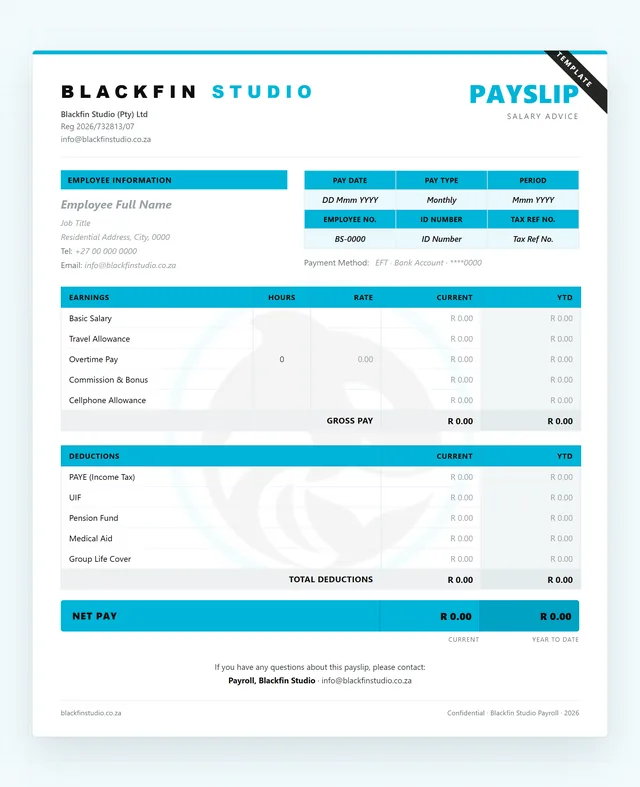
The document you already send is the document Orca Merge uses. Not a copy, not a rebuild, not a re-export.
- Your Word template, with the spaces you want filled in
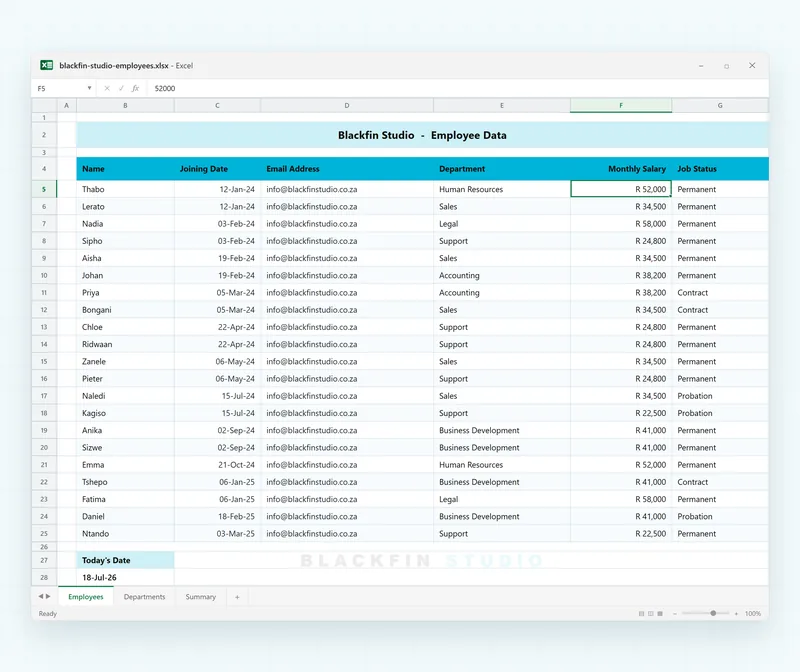
- Your Excel sheet, one row per person and one column per field
- Orca Merge keeps an untouched copy of the template before anything happens
The dashed cells are the spaces Orca Merge will fill. Everything else in the document is left exactly as it is.
-
Step 02
Click the document, not a merge code
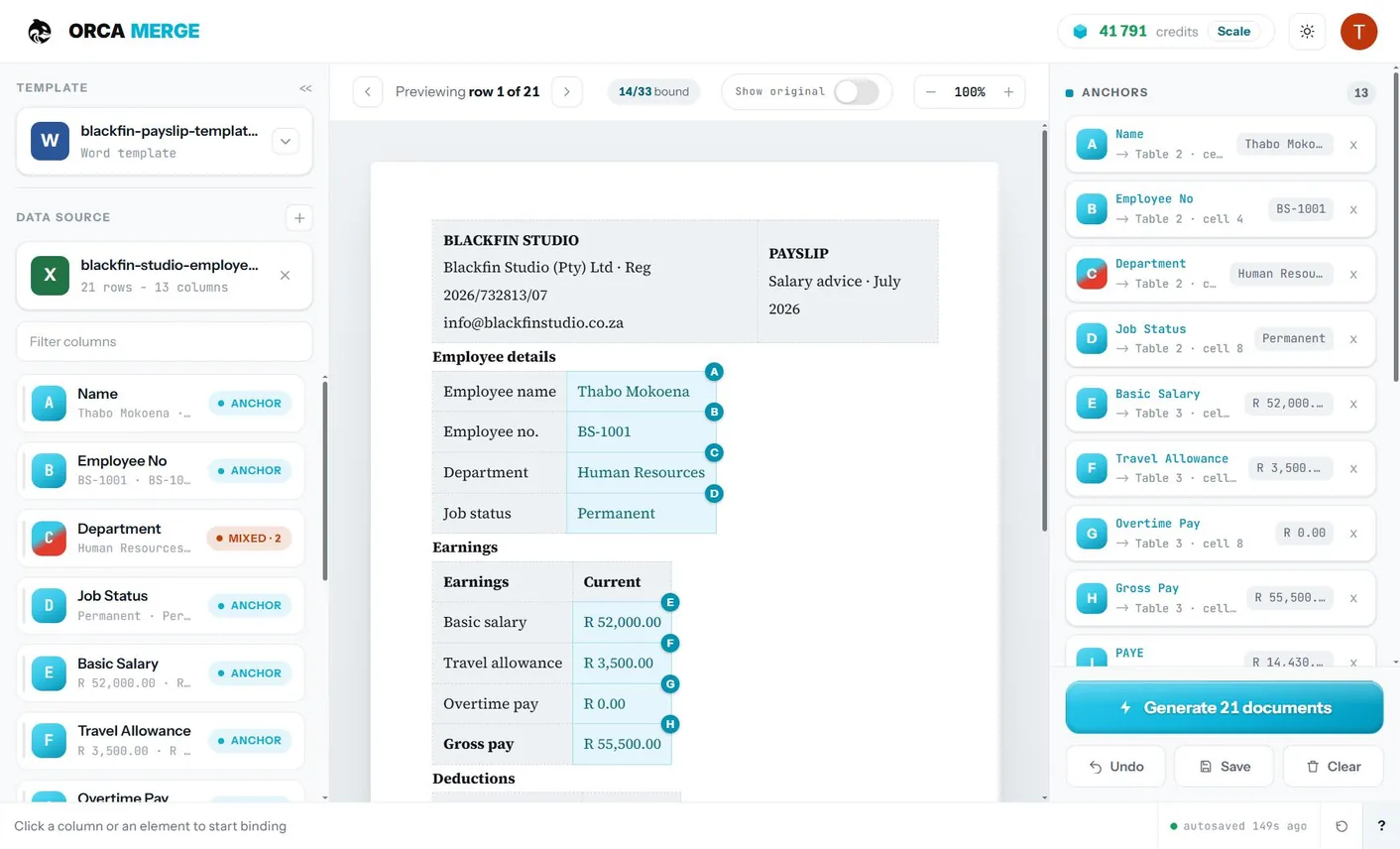
Orca Merge renders your actual document on screen. Pick a column, then click a cell, click a placeholder, or just highlight the words you want replaced.
- Works on tables, on
{placeholders}and on plain sentences. Your document needs no structure it does not already have - Nothing is typed into your file, so nothing needs re-approving
- A counter tracks what is bound and what is left
- Step through rows to see real data in place before you run
One column bound to a table cell, another bound to highlighted words in an ordinary sentence. Neither put a single character into the file.
- Works on tables, on
-
Step 03
Check it, then run it
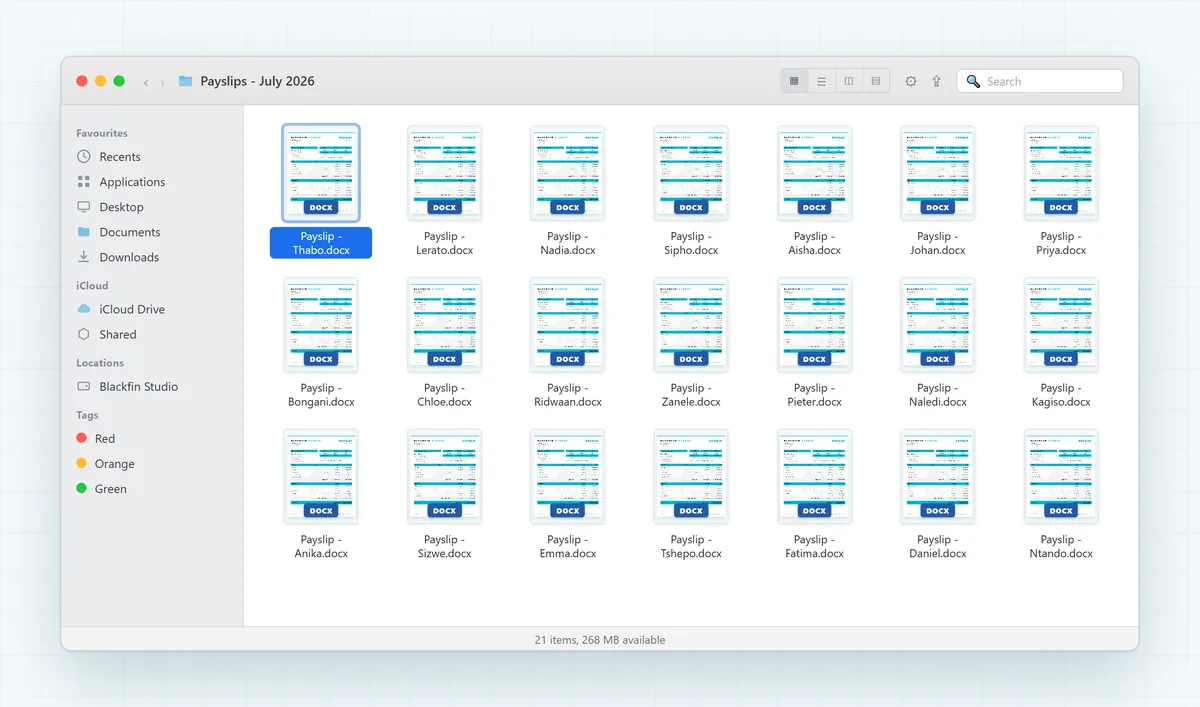
Orca Merge checks the file before anything happens, then builds one document per row and hands the whole run back as a single download.
- A missing column or an empty sheet stops it up front, so you never get a half-wrong pack
- 42 rows becomes 42 documents
- A finished Word document for every row
- Everything arrives as one .zip, not five hundred separate downloads
Row 42 becomes document 42, every time.
-
Every month after
Upload the new data. Press generate.
The mapping is saved with the template, so the setup never happens again.
- Drop in this month's spreadsheet
- The mapping from step 2 is already there
- Press generate. That is the entire run
Same template, new spreadsheet. The only thing that changes month to month is the data.
Why Orca Merge
The document you send is the
document you approved
Your template is not a draft. Somebody approved the wording. Somebody signed off the layout. Legal has a copy. The moment a tool asks you to type <<Name>> into it, that file is a new file, and a new file needs approving again.
100 documents free for your first week. No card.
Compared with doing it by hand
Word can do a mail merge. It cannot do this.
Where your data sits
Processed in South Africa.
Four things a compliance review always asks, answered up front.
Stored and processed in South Africa
Your spreadsheets, templates and finished documents are stored and processed in South Africa, and never leave it.
No password to lose
Sign in with Google, Microsoft or an email link. We never store one.
Workspaces walled off
Your data is kept separate from every other customer’s.
Deleted on a schedule, not kept forever
Your uploaded spreadsheet is deleted after 7 days and your finished documents after 30. Templates stay until you delete them.
Ask us anything a compliance review would ask and you will get a written answer. Send us your questions
Put your own template in and see what comes out.
100 documents free for your first week. No card.
Try it with your own templateStraight answers.
Including the things Orca Merge does not do yet.
Something not answered here? Ask usDo I have to change my template?
No, and that is the whole point of the product. Orca Merge reads the Word file you already use, renders it on screen, and binds each field by click. Nothing is typed into your document, so nothing in it has to be approved again.
What files does it take?
A Word template (.docx) and an Excel data file (.xlsx). CSV is not supported yet, and neither is the older .xls format.
Does Orca Merge email the documents?
Not yet. Email delivery, with a delivery report for every recipient, is coming to Enterprise. Today every plan hands the whole run back as a single download, and sending stays with you. Get notified when it is ready.
Can I get a PDF for each person?
Not yet. Every plan produces Word .docx documents today. A finished PDF for each person is coming to Enterprise. Get notified when it is ready.
What if each person's document has a different number of line items?
That works, as long as everything comes from one template and one Excel file. Each person is one row, so their line items sit side by side on that row: Item 1, Amount 1, Item 2, Amount 2 and so on, up to the most items anyone has. Someone with fewer items gets blank lines in the spare slots, so every document keeps the same layout. Orca Merge reads the first sheet of one data file; it does not combine a second sheet or a second spreadsheet.
How big a run can Orca Merge handle?
Up to 1,000 documents a run on Lite, 10,000 on Pro and 20,000 on Scale. Ten thousand documents take about fifteen minutes. For anything larger, talk to us.
Do I need IT?
No. Orca Merge runs in a browser. There is nothing to install, nothing to enable and nothing for IT to sign off.
Is there a free trial?
100 documents free for your first week, with no card.
Where is my data processed?
In South Africa. Sign-in is by Google, Microsoft or an email link, so there is no password for us to store. Your data is kept separate from every other customer’s.
What counts as a credit?
One generated document per row of your data. A 500-row spreadsheet uses 500 credits.
What happens to unused credits?
They roll over and never expire. If you cancel, the balance freezes rather than disappearing.
Can I change plans later?
Yes, up or down at any time. You can also top up mid-month without changing plan.
CONTACT
Talk to the team.
Questions about Orca Merge, a big run, or a custom document job? Email us and a real person replies.
Ways to reach us
What happens next
- We read every message.
- A real person replies within 1 business day.
- No sales spam - ever.
Prefer to just see it work?
Try free - no card neededEmail the team
Tell us what you produce, how many documents a run, and how often. For a large or custom run, a sample template helps.
sales@blackfinstudio.co.za Email us